Tesla 2026.16.6 Release Notes
Last updated 20-Jun-2026
Tesla 2026.16.6 Release notes including New Release, Autopilot Naming Update, FSD (Supervised) v14.3.3 Down Under, Arrival Options, Speed Profiles, UI Improvements, Brake Confirm, Full Self-Driving (Supervised) Down Under, all generated by real cars. Each release note includes a list of the countries, mndels and certain hardware features which apply.
Release 2026.16.6
Including 2026.16.6, (0.15 % of cars)
New Release (part of 2026.16.6)
New release spotted being downloaded to a Model Y. Release notes will be added when we have them. If you have this version and wish to share the release notes with us, we would be happy to receive them.
Autopilot Naming Update (part of 2026.16.6)
This change only updates the name of certain features and text in your vehicle, and does not change the way your features behave.
- Navigate on Autopilot has been renamed to Navigate on Autosteer
- FSD Computer has been renamed to AI Computer.
Seen in AU
Seen on MY(J)
Seen on AP versions AP4
Seen on MCU hardware Ryzen
FSD (Supervised) v14.3.3 Down Under (part of 2026.16.6)
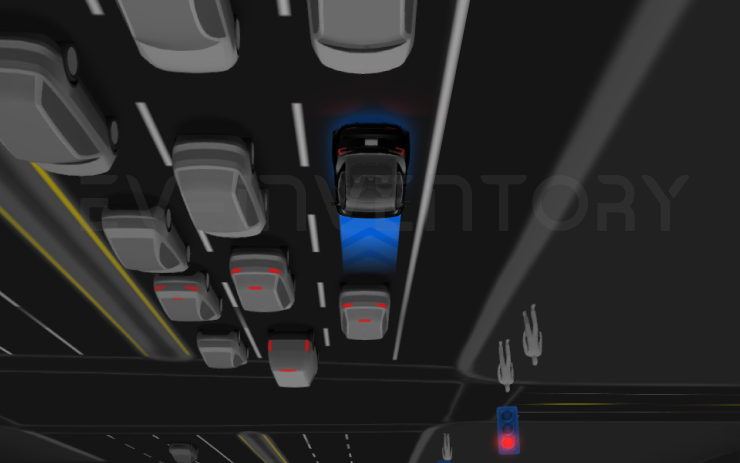
Full Self-Driving (Supervised) v14.3.3 includes:
- Upgraded the Reinforcement Learning (RL) stage of training the FSD neural network, resulting in improvements in a wide variety of driving scenarios.
- Upgraded the neural network vision encoder, improving understanding in rare and low-visibility scenarios, strengthening 3D geometry understanding, and expanding traffic sign understanding.
- Rewrote the AI compiler and runtime from the ground up with MLIR, resulting in 20% faster reaction time and improving model iteration speed.
- Mitigated unnecessary lane biasing and minor tailgating behaviors.
- Increased decisiveness of parking spot selection and maneuvering.
- Improved parking location pin prediction, now shown on a map with a P icon.
- Enhanced response to emergency vehicles, school buses, right-of-way violators, and other rare vehicles.
- Improved handling of small animals by focusing RL training on harder examples and adding rewards for better proactive safety.
- Improved traffic light handling at complex intersections with compound lights, curved roads, and yellow light stopping — driven by training on hard RL examples sourced from the Tesla fleet.
- Improved handling for rare and unusual objects extending, hanging, or leaning into the vehicle path by sourcing infrequent events from the fleet.
- Improved handling of temporary system degradations by maintaining control and automatically recovering without driver intervention, reducing unnecessary disengagements.
- Improved driver monitoring system sensitivity with better eye gaze tracking, eye wear handling, and higher accuracy in variable lighting conditions.
- Help Tesla improve Self-Driving by selecting an intervention reason on the main screen after taking over.
- You can now see distance traveled in FSD (Supervised) without an intervention. The Self-Driving App will also show your longest intervention-free streak.
Upcoming Improvements:
- Expand reasoning to all behaviors beyond destination handling.
- Add pothole avoidance.
Seen in AU
Seen on MY(J)
Seen on AP versions AP4
Seen on MCU hardware Ryzen
Arrival Options (part of 2026.16.6)
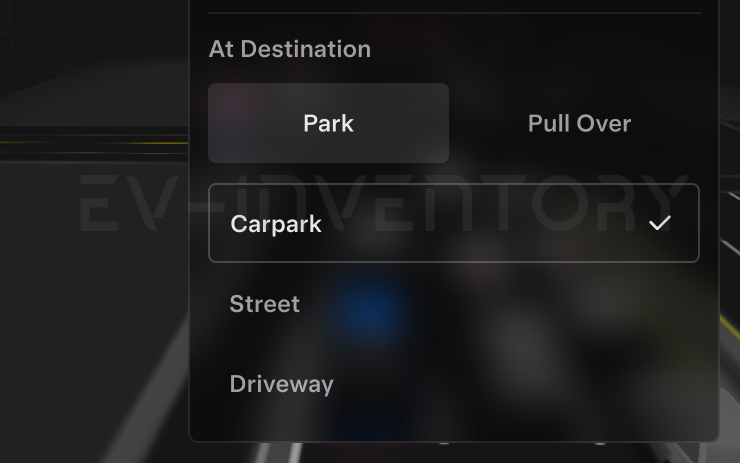
- You can now select an arrival option such as Carpark, Indoor Carpark, Street, Driveway, and Pull Over for Robotaxi-style drop offs.
- Your preferences for arrival options and preferred parking positions are persisted for each destination.
- Our reasoning model will assess the suitable options for your destination and pick an intuitive default.
- The navigation pin will be adjusted based on the selected Arrival Option.
Seen in AU
Seen on MY(J)
Seen on AP versions AP4
Seen on MCU hardware Ryzen
Speed Profiles (part of 2026.16.6)
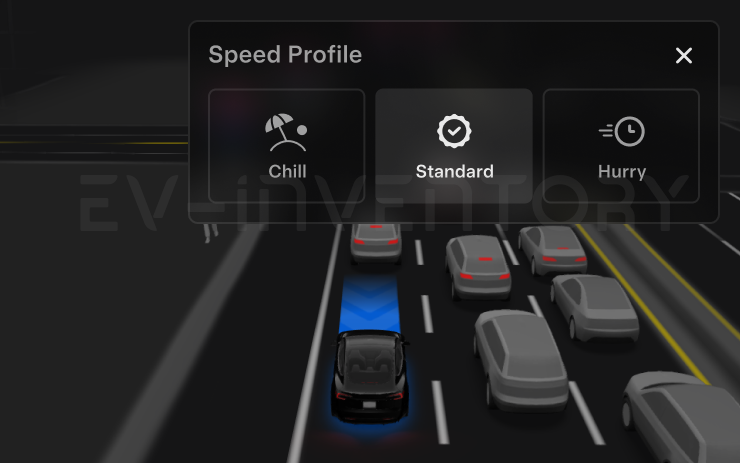
FSD (Supervised) will now determine the appropriate speed based on a mix of driver profile, speed limit, and surrounding traffic.
- Driver profile now has a stronger impact on behavior. The more assertive the profile, the higher the max speed.
- Right scroll-wheel up/down now adjusts Speed Profile setting rather than your precise max speed offset selection in mph or km/h.
- Introduced new Speed Profile SLOTH, which comes with lower speeds & more conservative lane selection than CHILL.
Seen in AU
Seen on MY(J)
Seen on AP versions AP4
Seen on MCU hardware Ryzen
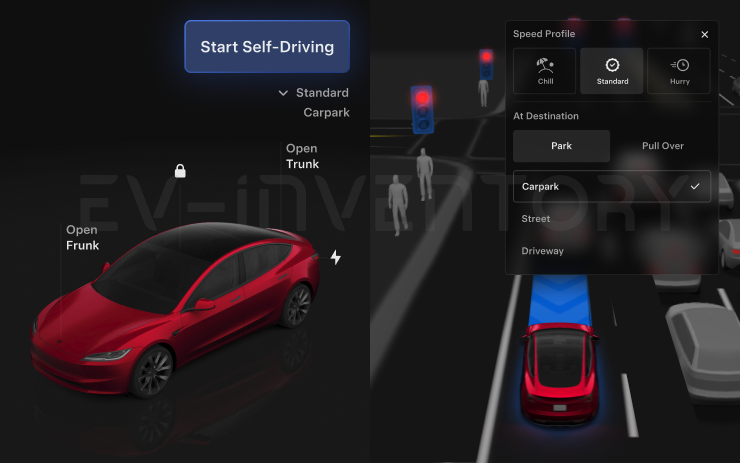
UI Improvements (part of 2026.16.6)
- You can now view your Self-Driving stats under Controls > Self-Driving.
- Start Self-Driving with a tap of the touchscreen from Park, or any time during your drive.
- Adjust settings like the Speed Profile and Arrival Options directly from the Self-Driving visualization on the center display.
Seen in AU
Seen on MY(J)
Seen on AP versions AP4
Seen on MCU hardware Ryzen
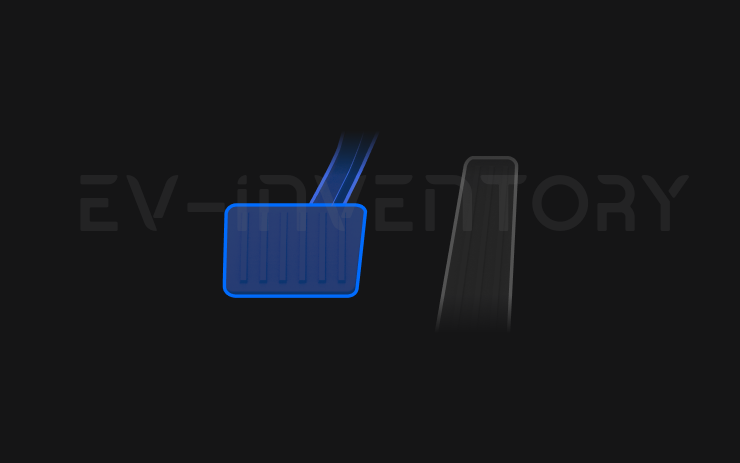
Brake Confirm (part of 2026.16.6)
Brake Confirm for the Start Self-Driving button is now defaulted off. When disabled, Start Self-Driving will not require you to press and release the brake to confirm engagement.
You can enable Brake Confirm in Self-Driving > Brake Confirm.
Seen in AU
Seen on MY(J)
Seen on AP versions AP4
Seen on MCU hardware Ryzen
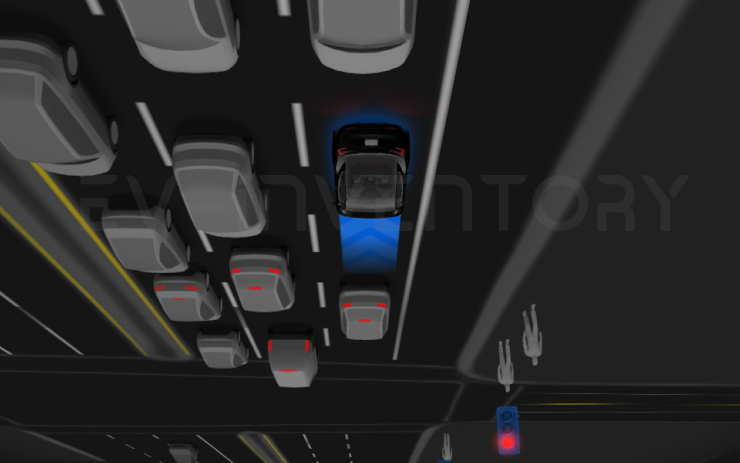
Full Self-Driving (Supervised) Down Under (part of 2026.16.6)
Under your supervision, Full Self-Driving (Supervised) Down Under can drive your Tesla almost anywhere. It will make lane changes, select forks to follow your navigation route, navigate around other vehicles and objects, and make left and right turns. You and anyone you authorise must use additional caution and remain attentive. It does not make your vehicle autonomous. Do not become complacent.
Full Self-Driving (Supervised) Down Under is enabled on your vehicle. To use the feature, press the right scroll wheel button once. You can disable Full Self-Driving (Supervised) Down Under in Self-Driving Settings.
Be aware of road conditions or hazards (such as pot holes and speed bumps) and operate the vehicle responsibly under all circumstances.
Seen in AU
Seen on MY(J)
Seen on AP versions AP4
Seen on MCU hardware Ryzen
Other release notes for the family: 2026.16
New Release (part of 2026.16.6)
New release spotted being downloaded to a Model Y. Release notes will be added when we have them. If you have this version and wish to share the release notes with us, we would be happy to receive them.
New Release (part of 2026.16.5)
New release spotted, release notes will be added when we have them. If you have this version and wish to share the release notes with us, we would be happy to receive them.
Autopilot Naming Update (part of 2026.16.6)
This change only updates the name of certain features and text in your vehicle, and does not change the way your features behave.
- Navigate on Autopilot has been renamed to Navigate on Autosteer
- FSD Computer has been renamed to AI Computer.
Seen in AU
Seen on MY(J)
Seen on AP versions AP4
Seen on MCU hardware Ryzen
FSD (Supervised) v14.3.3 Down Under (part of 2026.16.6)
Full Self-Driving (Supervised) v14.3.3 includes:
- Upgraded the Reinforcement Learning (RL) stage of training the FSD neural network, resulting in improvements in a wide variety of driving scenarios.
- Upgraded the neural network vision encoder, improving understanding in rare and low-visibility scenarios, strengthening 3D geometry understanding, and expanding traffic sign understanding.
- Rewrote the AI compiler and runtime from the ground up with MLIR, resulting in 20% faster reaction time and improving model iteration speed.
- Mitigated unnecessary lane biasing and minor tailgating behaviors.
- Increased decisiveness of parking spot selection and maneuvering.
- Improved parking location pin prediction, now shown on a map with a P icon.
- Enhanced response to emergency vehicles, school buses, right-of-way violators, and other rare vehicles.
- Improved handling of small animals by focusing RL training on harder examples and adding rewards for better proactive safety.
- Improved traffic light handling at complex intersections with compound lights, curved roads, and yellow light stopping — driven by training on hard RL examples sourced from the Tesla fleet.
- Improved handling for rare and unusual objects extending, hanging, or leaning into the vehicle path by sourcing infrequent events from the fleet.
- Improved handling of temporary system degradations by maintaining control and automatically recovering without driver intervention, reducing unnecessary disengagements.
- Improved driver monitoring system sensitivity with better eye gaze tracking, eye wear handling, and higher accuracy in variable lighting conditions.
- Help Tesla improve Self-Driving by selecting an intervention reason on the main screen after taking over.
- You can now see distance traveled in FSD (Supervised) without an intervention. The Self-Driving App will also show your longest intervention-free streak.
Upcoming Improvements:
- Expand reasoning to all behaviors beyond destination handling.
- Add pothole avoidance.
Seen in AU
Seen on MY(J)
Seen on AP versions AP4
Seen on MCU hardware Ryzen
Arrival Options (part of 2026.16.6)
- You can now select an arrival option such as Carpark, Indoor Carpark, Street, Driveway, and Pull Over for Robotaxi-style drop offs.
- Your preferences for arrival options and preferred parking positions are persisted for each destination.
- Our reasoning model will assess the suitable options for your destination and pick an intuitive default.
- The navigation pin will be adjusted based on the selected Arrival Option.
Seen in AU
Seen on MY(J)
Seen on AP versions AP4
Seen on MCU hardware Ryzen
Speed Profiles (part of 2026.16.6)
FSD (Supervised) will now determine the appropriate speed based on a mix of driver profile, speed limit, and surrounding traffic.
- Driver profile now has a stronger impact on behavior. The more assertive the profile, the higher the max speed.
- Right scroll-wheel up/down now adjusts Speed Profile setting rather than your precise max speed offset selection in mph or km/h.
- Introduced new Speed Profile SLOTH, which comes with lower speeds & more conservative lane selection than CHILL.
Seen in AU
Seen on MY(J)
Seen on AP versions AP4
Seen on MCU hardware Ryzen
UI Improvements (part of 2026.16.6)
- You can now view your Self-Driving stats under Controls > Self-Driving.
- Start Self-Driving with a tap of the touchscreen from Park, or any time during your drive.
- Adjust settings like the Speed Profile and Arrival Options directly from the Self-Driving visualization on the center display.
Seen in AU
Seen on MY(J)
Seen on AP versions AP4
Seen on MCU hardware Ryzen
Brake Confirm (part of 2026.16.6)
Brake Confirm for the Start Self-Driving button is now defaulted off. When disabled, Start Self-Driving will not require you to press and release the brake to confirm engagement.
You can enable Brake Confirm in Self-Driving > Brake Confirm.
Seen in AU
Seen on MY(J)
Seen on AP versions AP4
Seen on MCU hardware Ryzen
Full Self-Driving (Supervised) Down Under (part of 2026.16.6)
Under your supervision, Full Self-Driving (Supervised) Down Under can drive your Tesla almost anywhere. It will make lane changes, select forks to follow your navigation route, navigate around other vehicles and objects, and make left and right turns. You and anyone you authorise must use additional caution and remain attentive. It does not make your vehicle autonomous. Do not become complacent.
Full Self-Driving (Supervised) Down Under is enabled on your vehicle. To use the feature, press the right scroll wheel button once. You can disable Full Self-Driving (Supervised) Down Under in Self-Driving Settings.
Be aware of road conditions or hazards (such as pot holes and speed bumps) and operate the vehicle responsibly under all circumstances.
Seen in AU
Seen on MY(J)
Seen on AP versions AP4
Seen on MCU hardware Ryzen
Reboot after an update
Lot's of people have random issues after a software install, many of them curing themselves after a reboot. As a general rule, we'd suggest always doing a scroll wheel reboot after a software update, simply press the two steering wheel scroll wheels until the screen turns off and then let go. The screen will come back within a minute or so, depending on hardware. It's certainly worth doing this is you notice any unusual behaviour, but prevention is better than cure. There's a second reset option which is to change the car configuration slightly, either the language, or wheel type. This also causes the car to do a soft reset and this has returned missing features such as Tidal. Our Guide to rebooting your Tesla provides more details.
How to get the latest Tesla Software Update?
In a word, you can't really force it yourself although you can help the car to download the update once it's been allocated to have an update. To do so, connect the car to WiFi, and maybe even consider a wireless hotspot when in use. Car's not connected to WiFi generally do not receive updates quickly.
If you visit the software screen and see the car hasn't checked for a few days, perform a scroll wheel reset. The car typically checks as soon as it reboots and we've had a software update immediately afterwards as a result.
You may find the car sticks at 50% for a while. We've seen reports that keeping the car awake will help speed past past this point as the car will try and sleep and halt the process. Even keeping the mobile phone app open may help to prevent the car sleeping.
Why do I not get some of the features or changes mentioned?
There are a number of reasons why a particular feature or change may not be included when your car upgrades. These include regional restrictions, hardware specific features, model specific updates and some changes are linked to software options purchased such as EAP or FSD. There are also times when software release notes are provided but only Tesla test engineers get the updates.
Not having a listed feature or update for a particular car is therefore quite normal. Some websites try to detail which cars get which features but this is often inaccurate, such as the blended braking update that came out with 2022.16 and the alternate routes option in 2022.28.
Against each release note we now list the car models and countries where a particular release note has been seen.
I thought I already had a listed feature?
Just as a feature may not land in every car, the feature may be mentioned in later releases when your car already has it. The release notes in the car are tuned to your car so, and while in general the car will only report a new feature once, that is not a rule that always holds true. Some websites say the feature is not available in your country whereas the reality is the feature has been there for some time
I'm on the FSD City Streets Beta
The FSD City Streets Beta is usually 2 to 3 releases behind the general software releases. This is normal.
Numbering convention
Release notes are numbered roughly using the a year.family.major.minor format. The year is self explanatory, the family release typically increments in 4's and is roughly the week of the year when the release family is launched, although these tend to slip over the course of the year. The major and minor release numbers of much debated, we personally believe these rarely contain new features not included in the family, and if there are differences it is linked to hardware specific versions.
When reviewing release notes, you may be interested in how a feature has evolved. To enable this we have also included a keyword search where you can search for a word or phrase and we will filter the results accordingly.