Tesla 2025.44.25.1 Release Notes
Last updated 09-Dec-2025
Tesla 2025.44.25.1 Release notes including Automatic HOV Lanes Routing, Dashcam Viewer Update, Dog Mode Live Activity on iOS, Grok with Navigation Commands (Beta), Light Show Update, Minor Updates, Navigation Improvements, Paint Shop, Phone Left On Wireless Charger, Santa Mode Updates, Save Charge Limit by Location, SpaceX Docking Simulator, Supercharger Site Maps, Tesla Photobooth, all generated by real cars. Each release note includes a list of the countries, mndels and certain hardware features which apply.
For information on which versions are on specific models and years, see our Trending Tesla releases and statistics for more information.
Release 2025.44.25.1
Including 2025.44.25.1, (0.21 % of cars)
Regional availability of 2025.44.25.1 by modelNorth AmericaMS-M3MY-Europe-----RoW-----
A more detailed heat map and release statistics are available.
Grok with Navigation Commands (Beta) (part of 2025.44.25.1)
Grok can now add and edit navigation destinations, becoming your personal guide. You can ask Grok to navigate to the best Thai restaurant near you, find a Supercharger within walking distance of a coffee shop, or even plan a romantic sightseeing tour. Requires Premium Connectivity or a Wi-Fi connection. Conversations are anonymous to Tesla and are not associated with your vehicle.
Set Grok’s personality to Assistant to use Navigation Commands. Go to App Launcher > Grok, or long-press the voice button on your steering wheel after logging in to Grok.
Seen in CA US
Seen on MS(2021+) M3 MY
Seen on AP versions AP3
Seen on MCU hardware Ryzen
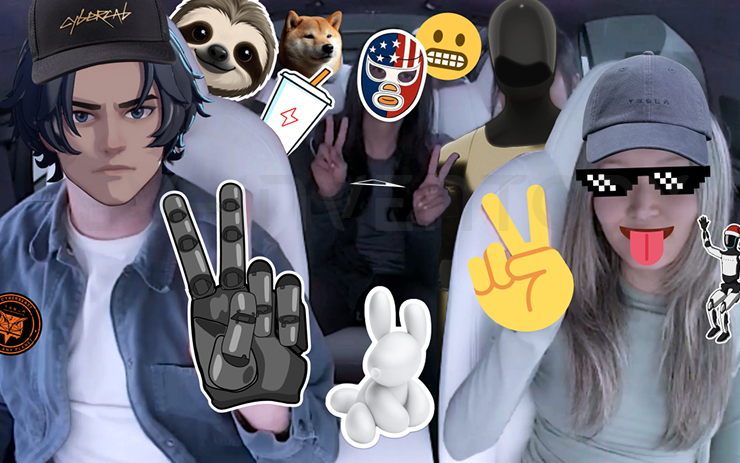
Tesla Photobooth (part of 2025.44.25.1)
Turn your car into a photobooth! Take selfies from inside your Tesla and give yourself a makeover with fun filters, stickers, and emojis. Share your stylish photos with friends and family right from the Tesla App. Your car must be in Park. Requires Tesla App version 4.51.5+.
Go to App Launcher > Toybox > Photobooth.
Seen in CA US
Seen on MS(2021+) M3 MY
Seen on AP versions AP3
Seen on MCU hardware Ryzen
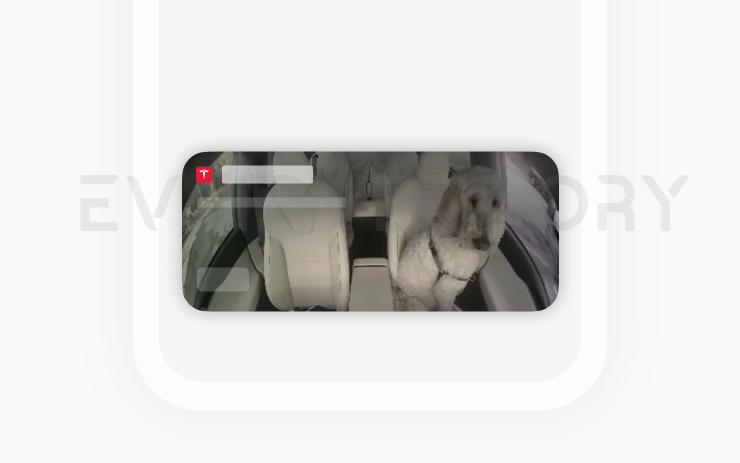
Dog Mode Live Activity on iOS (part of 2025.44.25.1)
Keep an eye on your pet! When Dog Mode is active, you’ll see a Live Activity on your iPhone with live updates on temperature and climate conditions. If you have Premium Connectivity, you’ll also get periodic snapshots of your vehicle’s cabin. Requires Tesla App version 4.51.5+.
Seen in CA US
Seen on MS(2021+) M3 MY
Seen on AP versions AP3
Seen on MCU hardware Ryzen
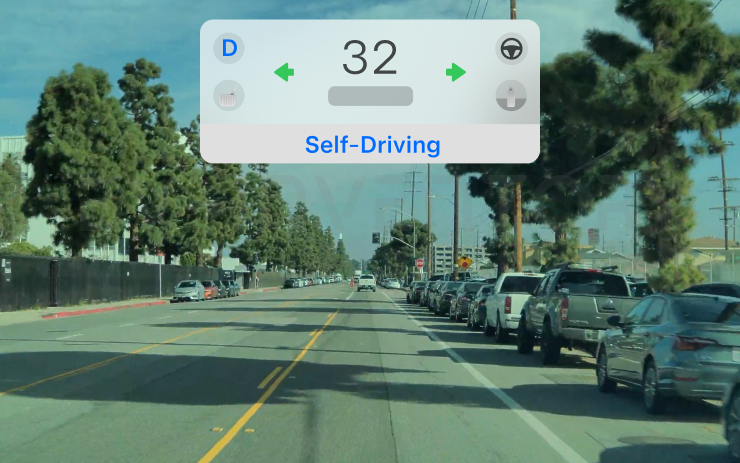
Dashcam Viewer Update (part of 2025.44.25.1)
Dashcam clips now include additional details such as speed, steering wheel angle, and self-driving state. This information appears in the Dashcam Viewer during playback on both the vehicle display and the Tesla App. Requires Premium Connectivity and Tesla App version 4.51.5+.
To enable viewing on your phone, go to Controls > Safety and turn on View Camera via Mobile App.
Seen in CA US
Seen on MS(2021+) M3 MY
Seen on AP versions AP3
Seen on MCU hardware Ryzen
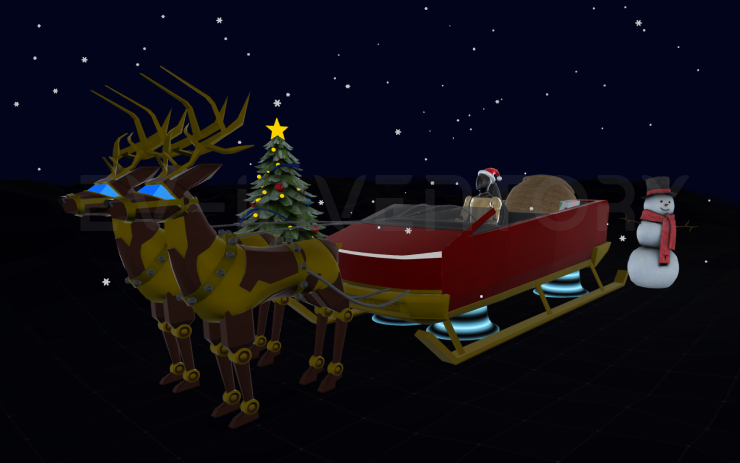
Santa Mode Updates (part of 2025.44.25.1)
Spread holiday cheer year round and transform your in-car experience with holiday themed effects. Santa Mode now adds festive snowmen, trees, a lock chime, and snow effects for a 3D visual treat.
Go to App Launcher > Toybox > Santa.
Seen in CA US
Seen on MS(2021+) M3 MY
Seen on AP versions AP3
Seen on MCU hardware Ryzen
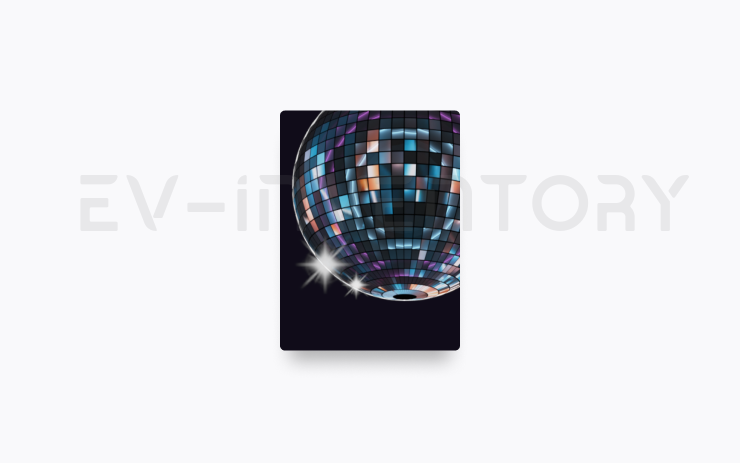
Light Show Update (part of 2025.44.25.1)
Time to celebrate with the latest Light Show - Jingle Rush. You can play the show instantly or schedule it up to 10 minutes in advance, either on a single vehicle or synced with friends. Light Show enthusiasts can control interior lighting, add display color effects, and create longer custom shows. To play a custom show, save the show files in a "LightShow" folder on your flash drive, connect, and select.
Start the show from your Tesla App or go App Launcher > Toybox > Light Show on your vehicle's touchscreen.
Seen in CA US
Seen on MS(2021+) M3 MY
Seen on AP versions AP3
Seen on MCU hardware Ryzen
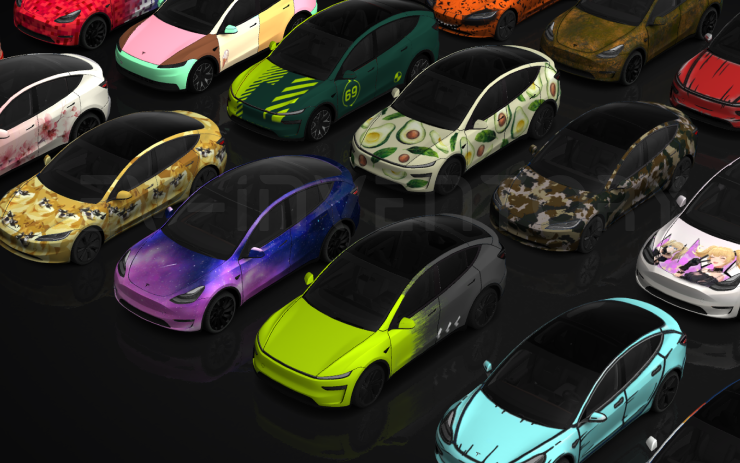
Paint Shop (part of 2025.44.25.1)
Personalize your Tesla avatar with window tints, custom wraps, and license plates. Use one of many preloaded designs or create and upload your own using a USB flash drive to make your vehicle unique.
Go to App Launcher > Toybox > Paint Shop or tap the paint or license plate button in Controls > Software.
Seen in CA US
Seen on M3 MY
Seen on AP versions AP3
Seen on MCU hardware Ryzen
Navigation Improvements (part of 2025.44.25.1)
You can now reorder your navigation favorites, set Home or Work by dropping a pin anywhere on the map, and view suggested destinations based on your recent trips and habits.
Seen in CA US
Seen on MS(2021+) M3 MY
Seen on AP versions AP3
Seen on MCU hardware Ryzen

Automatic HOV Lanes Routing (part of 2025.44.25.1)
Navigation now includes an option to use high-occupancy vehicle (HOV) carpool lanes automatically based on time, passenger count, and road restrictions.
Go to Controls > Navigation > Use HOV.
Seen in CA US
Seen on MS(2021+) M3 MY
Seen on AP versions AP3
Seen on MCU hardware Ryzen
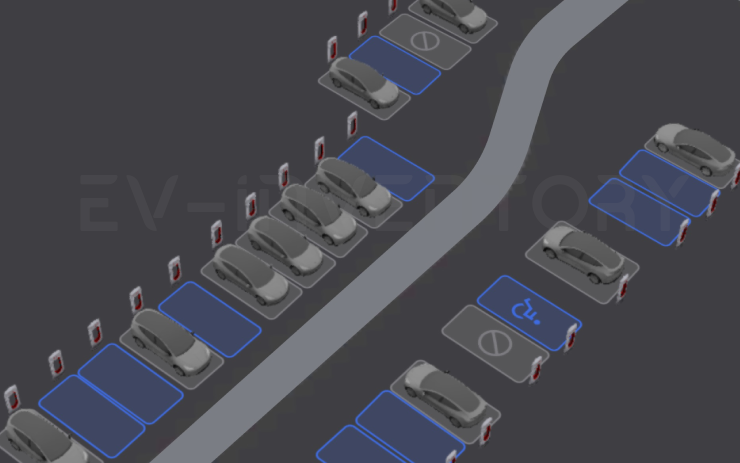
Supercharger Site Maps (part of 2025.44.25.1)
You can now see a 3D view of select Tesla Superchargers by tapping "View Site Map". When navigating to a pilot location, the site layout and live occupancy (Available / Occupied / Down) will be displayed upon arrival.
Seen in US
Seen on MS(2021+) M3 MY
Seen on AP versions AP3
Seen on MCU hardware Ryzen
Phone Left On Wireless Charger (part of 2025.44.25.1)
Your vehicle will chime a few seconds after the doors close if a phone is left on the wireless charger and no occupants are detected.
Go to Controls > Locks > Phone Left On Wireless Charger Chime.
Seen in CA US
Seen on MS(2021+) M3 MY
Seen on AP versions AP3
Seen on MCU hardware Ryzen

Save Charge Limit by Location (part of 2025.44.25.1)
You can now save a charge limit for your current location while parked, and it will be applied automatically next time you charge there.
Go to Controls > Charging.
Seen in CA US
Seen on MS(2021+) M3 MY
Seen on AP versions AP3
Seen on MCU hardware Ryzen
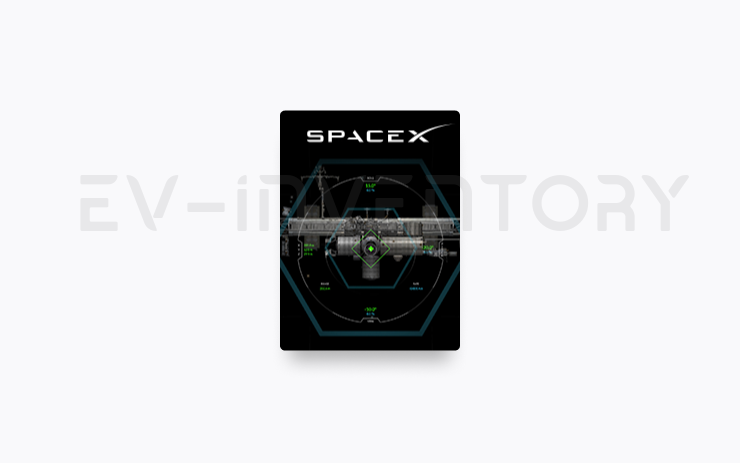
SpaceX Docking Simulator (part of 2025.44.25.1)
Become an astronaut and prove your skills by docking with the International Space Station. Control and guide the rocket in this 3D docking simulator game using a set of controls based on actual interfaces used by NASA astronauts.
To play, shift into Park (P), and go to App Launcher > Arcade > SpaceX.
Seen in CA US
Seen on MS(2021+) M3 MY
Seen on AP versions AP3
Seen on MCU hardware Ryzen

Minor Updates (part of 2025.44.25.1)
- Enable or disable wireless phone charging pads in Controls > Charging.
- Your vehicle will now send a mobile alert if any cabin door is left open while Dog Mode is active.
- Add Spotify tracks to your queue right from the search screen.
- Scroll through large Spotify playlists, albums, podcasts, audiobooks, and your library seamlessly, without paging.
- Lock Sound now includes Light Cycle from Tron Mode. Go to App Launcher > Toybox > Boombox > Lock Sound.
Seen in CA US
Seen on MS(2021+) M3 MY
Seen on AP versions AP3
Seen on MCU hardware Ryzen
Other release notes for the family: 2025.44
Grok with Navigation Commands (Beta) (part of 2025.44.25.1)
Grok can now add and edit navigation destinations, becoming your personal guide. You can ask Grok to navigate to the best Thai restaurant near you, find a Supercharger within walking distance of a coffee shop, or even plan a romantic sightseeing tour. Requires Premium Connectivity or a Wi-Fi connection. Conversations are anonymous to Tesla and are not associated with your vehicle.
Set Grok’s personality to Assistant to use Navigation Commands. Go to App Launcher > Grok, or long-press the voice button on your steering wheel after logging in to Grok.
Seen in CA US
Seen on MS(2021+) M3 MY
Seen on AP versions AP3
Seen on MCU hardware Ryzen
Tesla Photobooth (part of 2025.44.25.1)
Turn your car into a photobooth! Take selfies from inside your Tesla and give yourself a makeover with fun filters, stickers, and emojis. Share your stylish photos with friends and family right from the Tesla App. Your car must be in Park. Requires Tesla App version 4.51.5+.
Go to App Launcher > Toybox > Photobooth.
Seen in CA US
Seen on MS(2021+) M3 MY
Seen on AP versions AP3
Seen on MCU hardware Ryzen
Dog Mode Live Activity on iOS (part of 2025.44.25.1)
Keep an eye on your pet! When Dog Mode is active, you’ll see a Live Activity on your iPhone with live updates on temperature and climate conditions. If you have Premium Connectivity, you’ll also get periodic snapshots of your vehicle’s cabin. Requires Tesla App version 4.51.5+.
Seen in CA US
Seen on MS(2021+) M3 MY
Seen on AP versions AP3
Seen on MCU hardware Ryzen
Dashcam Viewer Update (part of 2025.44.25.1)
Dashcam clips now include additional details such as speed, steering wheel angle, and self-driving state. This information appears in the Dashcam Viewer during playback on both the vehicle display and the Tesla App. Requires Premium Connectivity and Tesla App version 4.51.5+.
To enable viewing on your phone, go to Controls > Safety and turn on View Camera via Mobile App.
Seen in CA US
Seen on MS(2021+) M3 MY
Seen on AP versions AP3
Seen on MCU hardware Ryzen
Santa Mode Updates (part of 2025.44.25.1)
Spread holiday cheer year round and transform your in-car experience with holiday themed effects. Santa Mode now adds festive snowmen, trees, a lock chime, and snow effects for a 3D visual treat.
Go to App Launcher > Toybox > Santa.
Seen in CA US
Seen on MS(2021+) M3 MY
Seen on AP versions AP3
Seen on MCU hardware Ryzen
Light Show Update (part of 2025.44.25.1)
Time to celebrate with the latest Light Show - Jingle Rush. You can play the show instantly or schedule it up to 10 minutes in advance, either on a single vehicle or synced with friends. Light Show enthusiasts can control interior lighting, add display color effects, and create longer custom shows. To play a custom show, save the show files in a "LightShow" folder on your flash drive, connect, and select.
Start the show from your Tesla App or go App Launcher > Toybox > Light Show on your vehicle's touchscreen.
Seen in CA US
Seen on MS(2021+) M3 MY
Seen on AP versions AP3
Seen on MCU hardware Ryzen
Paint Shop (part of 2025.44.25.1)
Personalize your Tesla avatar with window tints, custom wraps, and license plates. Use one of many preloaded designs or create and upload your own using a USB flash drive to make your vehicle unique.
Go to App Launcher > Toybox > Paint Shop or tap the paint or license plate button in Controls > Software.
Seen in CA US
Seen on M3 MY
Seen on AP versions AP3
Seen on MCU hardware Ryzen
Navigation Improvements (part of 2025.44.25.1)
You can now reorder your navigation favorites, set Home or Work by dropping a pin anywhere on the map, and view suggested destinations based on your recent trips and habits.
Seen in CA US
Seen on MS(2021+) M3 MY
Seen on AP versions AP3
Seen on MCU hardware Ryzen
Automatic HOV Lanes Routing (part of 2025.44.25.1)
Navigation now includes an option to use high-occupancy vehicle (HOV) carpool lanes automatically based on time, passenger count, and road restrictions.
Go to Controls > Navigation > Use HOV.
Seen in CA US
Seen on MS(2021+) M3 MY
Seen on AP versions AP3
Seen on MCU hardware Ryzen
Supercharger Site Maps (part of 2025.44.25.1)
You can now see a 3D view of select Tesla Superchargers by tapping "View Site Map". When navigating to a pilot location, the site layout and live occupancy (Available / Occupied / Down) will be displayed upon arrival.
Seen in US
Seen on MS(2021+) M3 MY
Seen on AP versions AP3
Seen on MCU hardware Ryzen
Phone Left On Wireless Charger (part of 2025.44.25.1)
Your vehicle will chime a few seconds after the doors close if a phone is left on the wireless charger and no occupants are detected.
Go to Controls > Locks > Phone Left On Wireless Charger Chime.
Seen in CA US
Seen on MS(2021+) M3 MY
Seen on AP versions AP3
Seen on MCU hardware Ryzen
Save Charge Limit by Location (part of 2025.44.25.1)
You can now save a charge limit for your current location while parked, and it will be applied automatically next time you charge there.
Go to Controls > Charging.
Seen in CA US
Seen on MS(2021+) M3 MY
Seen on AP versions AP3
Seen on MCU hardware Ryzen
SpaceX Docking Simulator (part of 2025.44.25.1)
Become an astronaut and prove your skills by docking with the International Space Station. Control and guide the rocket in this 3D docking simulator game using a set of controls based on actual interfaces used by NASA astronauts.
To play, shift into Park (P), and go to App Launcher > Arcade > SpaceX.
Seen in CA US
Seen on MS(2021+) M3 MY
Seen on AP versions AP3
Seen on MCU hardware Ryzen
Minor Updates (part of 2025.44.25.1)
- Enable or disable wireless phone charging pads in Controls > Charging.
- Your vehicle will now send a mobile alert if any cabin door is left open while Dog Mode is active.
- Add Spotify tracks to your queue right from the search screen.
- Scroll through large Spotify playlists, albums, podcasts, audiobooks, and your library seamlessly, without paging.
- Lock Sound now includes Light Cycle from Tron Mode. Go to App Launcher > Toybox > Boombox > Lock Sound.
Seen in CA US
Seen on MS(2021+) M3 MY
Seen on AP versions AP3
Seen on MCU hardware Ryzen
Minor Fixes (part of 2025.44.3)
This release contains minor fixes and improvements
Seen in AE AT AU BE BG BR BY CA CH CZ DE DK DO EE ES FI FR GB GG GR HK HR HU IE IL IS IT JP KR LT LU LV MD MK MO MX MY NL NO PL PR PS PT RO RS SE SG SI SK TH TR TW UA US
Seen on MX MS(2021+) MX(2022+) M3 MY M3(H) MY(J) CT
Seen on AP versions AP1 AP2,5 AP3 AP4 PreAP1
Seen on MCU hardware Intel Ryzen
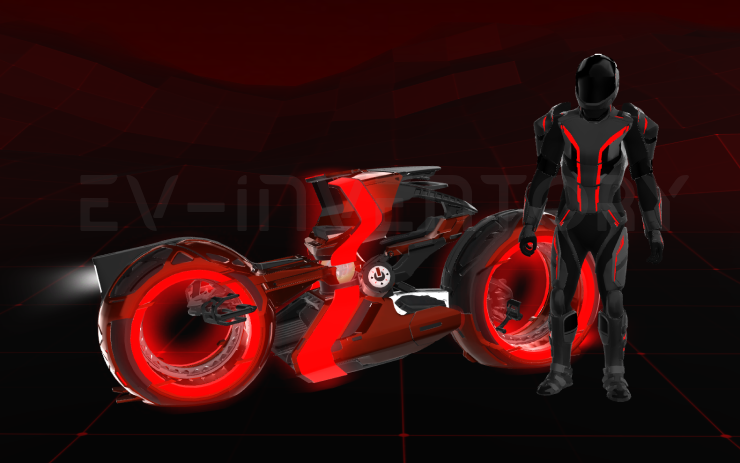
Tron Mode (part of 2025.44.3)
Greetings Programs. Transform your vehicle into the Light Cycle.
Go to App Launcher > Toybox > Tron.
Seen in CA DO MX US
Seen on M3 MY M3(H)
Seen on AP versions AP3 AP4
Seen on MCU hardware Ryzen

Satellite View (part of 2025.44.3)
You can now switch to satellite view by tapping the globe icon on the map.
Seen in TR
Seen on MY MY(J)
Seen on AP versions AP3 AP4
Seen on MCU hardware Ryzen

Dashcam Update (part of 2025.44)
The Dashcam Viewer app has been updated with a grid view, making it easier to access and review recordings.
Seen in AE AT AU BE BG BR BY CA CH CZ DE DK DO EE ES FI FR GB GR HK HU IE IL IS IT JP KR LT LU LV MK MY NL NO PL PT RO RS SE SG SI SK TR TW UA US
Seen on MX MS(2021+) MX(2022+) M3 MY
Seen on AP versions AP1 AP2,5 AP3 PreAP1
Seen on MCU hardware Intel
Minor Update (part of 2025.44)
- You can now choose Exclude Home when Cabin Overheat Protection or No A/C is enabled.
Seen in AE AT AU AZ BE BG BR BY CA CH CZ DE DK DO EE ES FI FR GB GG GR HK HR HU IE IL IS IT JP KR LT LU LV MD MK MO MX MY NL NO PL PR PS PT RO RS SE SG SI SK TH TR TW UA US
Seen on MX MS(2021+) MX(2022+) M3 MY M3(H) MY(J)
Seen on AP versions AP1 AP2,5 AP3 AP4 PreAP1
Seen on MCU hardware Intel Ryzen
Minor Updates (part of 2025.44)
- You can now choose Exclude Home when Cabin Overheat Protection is enabled.
- When your vehicle is powersharing, the charge port LED will flash green to indicate active power output.
Seen in US
Seen on CT
Seen on AP versions AP4
Seen on MCU hardware Ryzen
Radio Traffic Announcements (part of 2025.44)
Radio now supports Traffic Announcements in supported regions. Tap the traffic icon on the Now Playing screen to toggle the feature—when enabled, the bold icon indicates announcements will play.
Seen in AT BE BG CH CZ DE DK ES FI FR GB GR HR HU IE IT MD NL NO PL PT RO SE SI
Seen on MY M3(H) MY(J)
Seen on AP versions AP4
Seen on MCU hardware Ryzen

Onboarding Guide (part of 2025.44)
The Onboarding Guide helps you get familiar with your Tesla. It covers adjusting driver settings, using the touchscreen as well as controlling lights, wipers, and Autopilot features - among other functions.
Go to App launcher > Manual > Get To Know Your Tesla.
Seen in GB HK IE MY SG TH
Seen on M3(H) MY(J)
Seen on AP versions AP4
Seen on MCU hardware Ryzen
Reboot after an update
Lot's of people have random issues after a software install, many of them curing themselves after a reboot. As a general rule, we'd suggest always doing a scroll wheel reboot after a software update, simply press the two steering wheel scroll wheels until the screen turns off and then let go. The screen will come back within a minute or so, depending on hardware. It's certainly worth doing this is you notice any unusual behaviour, but prevention is better than cure. There's a second reset option which is to change the car configuration slightly, either the language, or wheel type. This also causes the car to do a soft reset and this has returned missing features such as Tidal. Our Guide to rebooting your Tesla provides more details.
How to get the latest Tesla Software Update?
In a word, you can't really force it yourself although you can help the car to download the update once it's been allocated to have an update. To do so, connect the car to WiFi, and maybe even consider a wireless hotspot when in use. Car's not connected to WiFi generally do not receive updates quickly.
If you visit the software screen and see the car hasn't checked for a few days, perform a scroll wheel reset. The car typically checks as soon as it reboots and we've had a software update immediately afterwards as a result.
You may find the car sticks at 50% for a while. We've seen reports that keeping the car awake will help speed past past this point as the car will try and sleep and halt the process. Even keeping the mobile phone app open may help to prevent the car sleeping.
Why do I not get some of the features or changes mentioned?
There are a number of reasons why a particular feature or change may not be included when your car upgrades. These include regional restrictions, hardware specific features, model specific updates and some changes are linked to software options purchased such as EAP or FSD. There are also times when software release notes are provided but only Tesla test engineers get the updates.
Not having a listed feature or update for a particular car is therefore quite normal. Some websites try to detail which cars get which features but this is often inaccurate, such as the blended braking update that came out with 2022.16 and the alternate routes option in 2022.28.
Against each release note we now list the car models and countries where a particular release note has been seen.
I thought I already had a listed feature?
Just as a feature may not land in every car, the feature may be mentioned in later releases when your car already has it. The release notes in the car are tuned to your car so, and while in general the car will only report a new feature once, that is not a rule that always holds true. Some websites say the feature is not available in your country whereas the reality is the feature has been there for some time
I'm on the FSD City Streets Beta
The FSD City Streets Beta is usually 2 to 3 releases behind the general software releases. This is normal.
Numbering convention
Release notes are numbered roughly using the a year.family.major.minor format. The year is self explanatory, the family release typically increments in 4's and is roughly the week of the year when the release family is launched, although these tend to slip over the course of the year. The major and minor release numbers of much debated, we personally believe these rarely contain new features not included in the family, and if there are differences it is linked to hardware specific versions.
When reviewing release notes, you may be interested in how a feature has evolved. To enable this we have also included a keyword search where you can search for a word or phrase and we will filter the results accordingly.